
Gacha Life 2
LunimeCasual
4.115.11K Reviews
- Version
- 0.96
- Installs
- 10.00M
- Age Rating
- Everyone
Screenshots
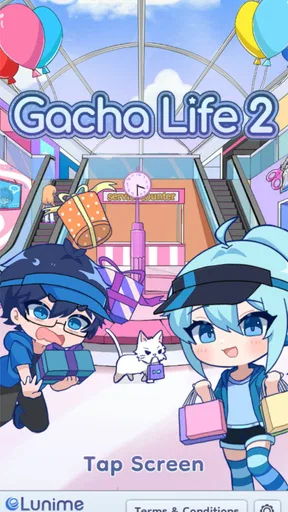
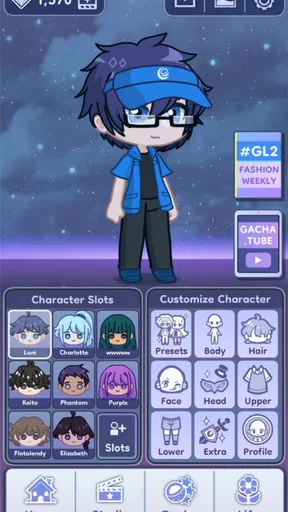
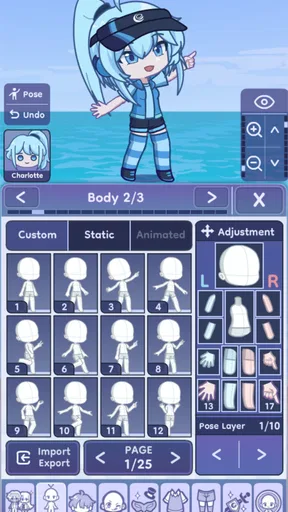
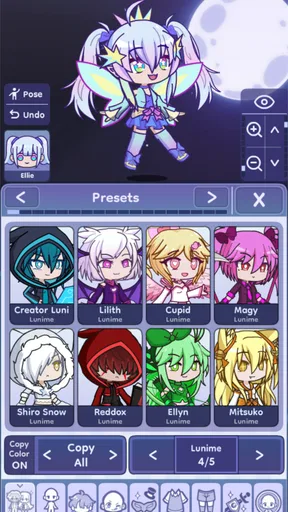
Our Review of Gacha Life 2
 Analysis by Appyee
Gacha Life 2 is the kind of casual game I open when I want to make something rather than win something. Its appeal is not a complicated campaign or a demanding challenge. Instead, it gives me a flexible anime-style character workshop where clothing, colors, poses, expressions, and small visual details become the main activity. After spending time with it, my clear impression is that Lunime has made a strong creative sandbox for people who enjoy designing characters, building little scenes, and sharing ideas visually.
That focus also explains its limits. If you are looking for a traditional game with missions, strategic progression, or a strong reason to return every day, this may feel more like a dress-up studio than a complete game. For me, that is not a flaw by itself; it simply means the right audience matters. The experience works best when I treat it as a pocket character-creation tool with casual game elements, not as a competitive or story-heavy adventure.
Why the character editor is the real attraction
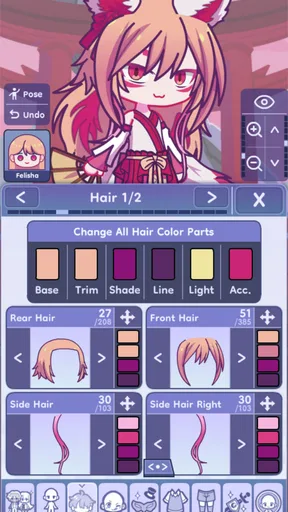
The first thing that kept me interested was how much of the experience happens before any scene is created. I can begin with a basic anime-inspired character and then adjust the overall look through clothing, hair, facial details, colors, and accessories. The fun comes from making several choices work together. A striking hairstyle can change the mood of an outfit, while a small color adjustment can make a character look more coherent.
I found it more satisfying to build a character around a simple idea instead of changing everything at random. For example, I might start with a quiet school character, a fantasy traveler, or a bright pop performer. Choosing the main color first helps me avoid a costume that feels visually noisy. I then use the face and hair to establish personality, leaving accessories for the final pass. That workflow makes the editor feel less overwhelming and produces better results than tapping through every option without a plan.
The clothing system is especially useful for players who like visual storytelling. An outfit can suggest a character’s job, age, attitude, or role in a scene before the character says anything. A formal look can make a character appear serious, while layered casual clothing can make the same design feel more relaxed. I appreciate that the game encourages this kind of thinking without requiring drawing skills.
The strongest part of the experience is the ability to turn a vague character idea into a recognizable visual identity. I do not need to sketch anatomy, understand complex art software, or learn animation tools. I can experiment directly and see the result immediately. That makes the game approachable for younger players, casual creators, and anyone who enjoys making original avatars but does not want a technical design program.
It is also easy to underestimate how useful the editor can be for planning. I have used character creators in the past as a way to test personalities and relationships before writing a story. This game suits that process well. I can create a small cast, give each person a distinct silhouette and color scheme, and then place them together to see whether they look like they belong in the same fictional world.
Scenes make the designs more useful
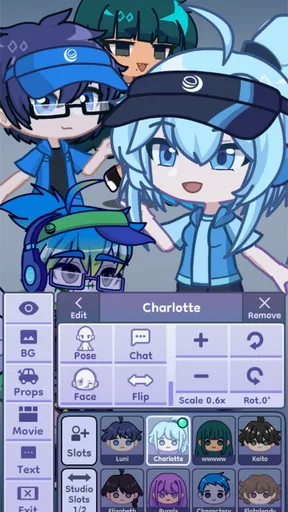
Character customization would become repetitive if the finished designs had nowhere to go. The scene-building side gives them a purpose. I can arrange characters, choose expressions and poses, and create a snapshot that suggests a conversation or a particular moment. Even a simple composition can communicate who is confident, who is nervous, and who is being left out.
One practical approach is to build scenes in layers. I first decide what the main action is, then place the most important character where the eye naturally goes. After that, I add supporting characters and adjust their poses so they do not all appear to be standing in the same way. Finally, I check the colors. If everyone wears similarly bright clothing, the scene can lose its focus, so giving one character a simpler outfit often helps.
This is one of the less obvious strengths of the game: it can teach basic visual composition through play. The tools are simple enough for experimentation, but they still reward decisions about contrast, spacing, and expression. I would not call it a replacement for an illustration application, yet it offers a friendlier first step for someone who wants to understand how characters work together in a frame.
A realistic everyday use is making a quick visual for a group chat or creating a small cast for a personal story. A student could design characters for a writing project, while a younger player might make a funny scene featuring friends as fictional avatars. The process is faster than drawing each person from scratch, and the result has a consistent style because the same editor supplies the visual parts.
What the casual format gets right
As a casual game, it is easy to approach in short sessions. I can spend a few minutes changing a hairstyle or stay longer while refining a complete character. There is no need to understand a complicated control scheme before experimenting. That makes it suitable for relaxed play on a phone, especially when I want a creative distraction instead of a game that demands concentration.
The free price is important here. It lowers the barrier for trying the editor and makes it easier to recommend to a friend who is curious about anime-style character creation. The game is listed for Everyone, which matches the accessible tone of the creative tools. Parents should still remember that a general age label does not replace their own judgment about how a child uses any social or sharing-related features around a game, but the core activity itself is easy to understand.
The game has also found a substantial audience. It has an average rating of 4.1 from around 282 thousand ratings, with more than 10 million installs. Those figures do not guarantee that every player will enjoy it, but they do reflect a broad interest in Lunime’s particular blend of customization and casual scene creation. I think that popularity comes from the low-pressure format: players can engage deeply or simply make a funny outfit and leave.
Where the experience starts to feel limited
The same openness that makes the game welcoming can make it feel directionless. Once I have created several characters and scenes, the next step depends largely on my own imagination. Players who need objectives, unlockable milestones, or a clear campaign may wonder what they are supposed to do after the initial discovery period.
This is the most meaningful weakness in my experience. The editor offers room to create, but it does not automatically provide a reason to keep creating. A person who enjoys inventing stories will see possibilities everywhere. Someone who prefers structured gameplay may instead see a collection of tools without enough guidance. Neither reaction is wrong; they simply point to different expectations.
There is also a learning curve hidden inside the apparent simplicity. Individual controls are easy to understand, but the number of visual decisions can become tiring. I sometimes reached a point where I was adjusting tiny details without improving the overall design. The best solution was to save a workable version mentally, step away, and return with one specific goal, such as improving the color balance or making the expression fit the pose.
Another trade-off is consistency. Because the game gives me many ways to combine elements, it is possible to create a character with too many competing features. More accessories do not necessarily create a better design. New users may initially treat every available option as something that should be used, but restraint usually produces a cleaner result. The game gives freedom; it does not always tell me when to stop.
Compared with a conventional dress-up game, this offers more room for character identity and scene-making. Compared with a drawing app, it is much faster and less technically demanding, but also less open-ended because I work with the visual parts the game provides. Compared with a story-driven casual title, it gives me more authorship but much less narrative direction. Those differences are central to deciding whether it belongs on your phone.
Tips for getting better results without wasting time
My first tip is to create a limited palette for each character. I usually choose one main color, one supporting color, and a neutral shade before selecting clothing. This prevents the outfit from becoming a random collection of attractive pieces. It also helps a group of characters look related while keeping each person distinct.
My second tip is to design the silhouette before polishing the face. Hair shape, coat length, sleeves, and large accessories are visible from a distance and often communicate more than tiny facial adjustments. Once the outline feels recognizable, I refine the eyes, mouth, and expression. This order saves time because it prevents me from perfecting a face that later clashes with the outfit.
My third tip is to make alternate versions of the same character instead of constantly replacing the original. A casual outfit, formal outfit, and activity-specific outfit can reveal which parts of the design are essential. If the character only looks recognizable in one costume, the hair color, face, or silhouette may need stronger definition.
For scenes, I recommend starting with two characters rather than filling the frame immediately. Two people make it easier to test eye direction, spacing, and emotional contrast. Once the relationship is clear, a third character can add tension or humor. This approach is more effective than placing a large group together and hoping the scene explains itself.
It is also worth treating expressions as part of the story rather than decoration. A neutral pose can work for a quiet conversation, but it may make an exciting event look flat. I try to give each person a different emotional role: one reacts strongly, another stays calm, and a third looks uncertain. Even with simple tools, that contrast makes the final scene feel more intentional.
Who will enjoy it most
I would recommend it first to players who enjoy anime-inspired fashion, avatar creation, visual storytelling, and making original characters. It is particularly good for someone who likes to spend time tweaking details without pressure to complete a level. Younger creators may enjoy the immediate visual feedback, while older fans can use it for character concepts, comedy scenes, or informal storyboarding.
It is also a good fit for friends who want to make themed characters together. One person can suggest a personality while another chooses clothes and expressions, turning the editor into a shared creative activity. Because the game is free, it is easy for a group to try without making a purchase decision first.
I would be more cautious about recommending it to someone who wants action, competition, deep role-playing systems, or a tightly written story. It may also disappoint players who expect every customization option to lead to meaningful progression. If your favorite casual games provide constant objectives and rewards, this one may feel too self-directed.
The current version is 0.96, and it runs on Android devices using version 5.0 or later. That makes it accessible to many phones, although the actual comfort of editing depends on screen size and responsiveness. On a smaller display, detailed customization can feel cramped, especially when I am trying to compare several visual elements. A larger phone or tablet-style screen is preferable for long design sessions.
Lunime’s identity is clear throughout the game. It is not trying to imitate a realistic fashion simulator or a professional art package. The exaggerated anime presentation, approachable controls, and emphasis on personal characters are the point. Once I accepted that, I stopped judging it by the standards of story campaigns and enjoyed it more as a creative playground.
My verdict after using the creative tools
Gacha Life 2 works because it gives casual players a quick route from idea to image. I can imagine a character, assemble a look, place that character in a scene, and revise the result without needing specialist knowledge. That combination is more useful than the short store summary suggests, especially for people who want to explore storytelling through visual design.
Its weakness is equally clear: the game cannot supply the imagination or motivation needed to keep going. After the novelty of the editor fades, I need my own projects, characters, jokes, or scenes to give the experience direction. Players who enjoy open-ended creation will see that as freedom. Players who want a defined game loop may see it as a lack of content.
For me, the balance is worthwhile because the free entry point makes experimentation easy and the tools support more than simple outfit changes. I can use it for quick character references, small visual stories, group concepts, or a relaxing design session. I would choose a drawing application for full artistic control and a conventional casual game for structured goals, but I would choose this when I want fast, approachable anime character creation.
My recommendation is simple: install it if making characters sounds like the fun part, not merely a feature before the “real” game begins. With that expectation, Lunime’s casual creation experience is engaging, flexible, and surprisingly useful. Without it, the open-ended format may feel empty. That makes it a focused recommendation rather than a universal one, but for its intended audience, it is an enjoyable place to turn a few visual ideas into something I can actually see and share.
Verdict
Strengths of Gacha Life 2
- Deep character customization with detailed outfits, poses, and facial features.
- Studio mode makes it easy to create scenes, skits, and screenshots.
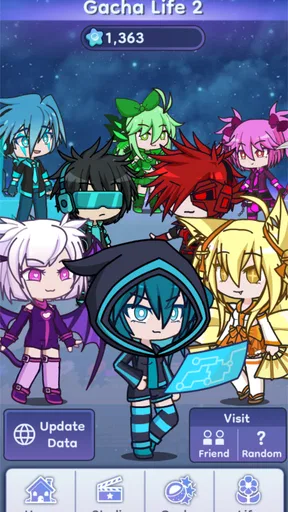
- Large cast of characters supports varied stories and roleplay ideas.
- Offline play is available for many core features after installation.
- Bright anime-inspired visuals are appealing to younger players.
Limitations of Gacha Life 2
- The many menus and options can feel overwhelming for new players.
- Some devices may experience lag when scenes contain many characters.
- Limited animation tools make complex storytelling feel restrictive.
- The game’s style may not appeal to players seeking realistic graphics.
- Frequent customization can become repetitive without a clear creative goal.
Other Releases by Lunime
View All
Gacha Life
Casual4.5
Similar Picks in This Category
View All
My Talking Angela
Outfit7 Limited4.2

My Talking Tom
Outfit7 Limited4.3

Pou
Zakeh4.2

My Talking Tom 2: Pet Game
Outfit7 Limited4.3

Candy Crush Saga
King4.6

Bridge Race
Supersonic Studios LTD4.1
Frequently Asked Questions
What is Gacha Life 2, and what can players do in the game?
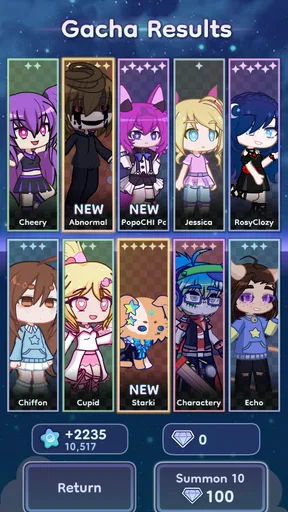
Gacha Life 2 is a character-creation and storytelling game where players design customizable anime-style characters, dress them in different outfits, and create scenes using backgrounds, poses, facial expressions, and dialogue. It also includes mini-games and gacha-style features for collecting items. The main appeal is creative freedom rather than a traditional campaign, so it is especially suitable for users who enjoy making skits, stories, and shareable scenes.
Is Gacha Life 2 free to download, and does it include in-app purchases?
Gacha Life 2 can generally be downloaded for free, allowing players to access its character editor, scene creator, and much of its customization content without an upfront purchase. Depending on the platform and version, optional advertisements or in-app purchases may be present. Parents should review the store listing and device purchase settings, because collectible items and premium content can make spending easier if purchases are not restricted.
Does Gacha Life 2 require an internet connection to play?
Many of Gacha Life 2’s core features, including creating characters and building scenes, can usually be used offline after the game has been installed. However, an internet connection may be needed for downloading updates, accessing certain advertisements, restoring purchases, or using any sharing-related functions. Availability can vary by device and version, so players should install the latest update and test offline access before relying on it without mobile data.
Is Gacha Life 2 appropriate for children and younger players?
Gacha Life 2 has a colorful, simple interface and creative tools that can appeal to children, but it is not automatically suitable for every age group. User-created stories may include mature themes, frightening situations, violence, or suggestive material, particularly when content is shared through external platforms. Parents should check the official age rating, supervise younger players, disable purchases when necessary, and discuss safe sharing and privacy habits.
What devices are compatible with Gacha Life 2, and does it need much storage?
Compatibility depends on the operating system version, device hardware, and the current release published in the Google Play Store or Apple App Store. Because the game includes many character assets, animations, backgrounds, and customization options, it may require more storage than a very small casual game. Before downloading, check the official store page for supported Android or iOS versions, available space, and any device-specific requirements.
Play our best games!


